Your Guide to the TRN Number UAE for VAT and E-Invoicing
Master the TRN Number UAE. Learn how to find, verify, and use it for FTA compliance and the upcoming 2026 e-invoicing mandate. Avoid common errors today.
Posted by
 Tadqiq Team
Related Reading
A Practical Guide to E-Invoicing in the UAE
Master e invoicing in UAE. This guide breaks down the PINT AE standard, FTA compliance deadlines, and how to prepare your business for the 2026 mandate.
Read →
A Practical Guide to HS Codes for Dubai Customs & E-Invoicing Compliance
Discover hs codes dubai customs and learn how accurate classifications speed up UAE trade, FTAs, and customs clearance.
Read →
A Guide to TRN Verification FTA for UAE E-Invoicing
Master TRN verification FTA for UAE e-invoicing. Our guide covers manual checks, APIs, and batch validation to ensure VAT compliance and avoid penalties.
Read →
In the UAE, your Tax Registration Number (TRN) is a unique, 15-digit ID the Federal Tax Authority (FTA) issues to businesses registered for Value Added Tax (VAT). Think of it as your company's official tax fingerprint—essential for filing returns, creating compliant tax invoices, and preparing for the country's mandatory e-invoicing system. Understanding its role is critical for every UAE business owner, accountant, and finance manager.
What Is a TRN Number and Why It Matters for Your Business

The Tax Registration Number is more than just a string of digits; it’s the bedrock of your company's tax identity in the UAE. Once the FTA issues your TRN after you register for VAT, your business is officially recognised within the national tax system. This number must appear on every tax invoice, credit note, and any official correspondence with the FTA.
For finance managers and accountants, the TRN is a daily operational tool. It's the number required to charge VAT on sales, claim back input tax on business purchases, and file accurate VAT returns on time. Without a valid TRN, a business cannot legally operate within the VAT system, which can lead to operational disruptions and significant penalties.
Who Needs a TRN in the UAE
Understanding the registration thresholds is the first step toward FTA compliance. Whether your business needs a TRN depends on your annual turnover from taxable supplies.
Here’s a simple breakdown:
- Mandatory Registration: If your business has a taxable turnover exceeding AED 375,000 over the last 12 months (or you expect it to in the next 30 days), you are legally required to register for VAT and obtain a TRN.
- Voluntary Registration: If your taxable turnover is between AED 187,500 and AED 375,000, you have the option to register. Many businesses in this bracket choose to register to claim back the VAT they pay on their expenses.
The Tax Registration Number (TRN) is a fundamental part of the UAE's tax ecosystem, especially with the e-invoicing mandate starting in July 2026. Every electronic invoice must include both the supplier's and buyer's TRN to be accepted by the FTA, ensuring data integrity within the PINT AE framework. Since VAT was introduced on January 1, 2018, over 500,000 businesses have obtained TRNs, contributing to a VAT revenue stream that reached AED 20 billion annually by 2025. Learn more about the role of tax registration identifiers in the new e-invoicing system.
Ensuring your TRN is correct isn't just about current compliance; it's about future-proofing your business. As the UAE transitions to mandatory UAE e-invoicing, this number will become the primary key for automated invoice validation, making accuracy more critical than ever.
How to Find and Verify Any UAE TRN Number
For any finance team in the UAE, checking the validity of a Tax Registration Number (TRN) is a crucial daily task. This small step ensures your transactions run smoothly and that your submissions for the new UAE e-invoicing system are accepted without issue.
Fortunately, the Federal Tax Authority (FTA) provides a simple, official tool for this purpose. It is the definitive source for confirming if a trn number uae is active and legitimate, helping you avoid payment delays and compliance problems.
Locating Your Own Company TRN
First, you must know your own TRN. This isn't just a number to add to invoices; it is your company's unique identifier within the entire UAE tax system.
You can find your company's 15-digit TRN clearly printed on your official VAT registration certificate. The easiest way to access this is by logging into your company’s account on the EmaraTax portal, where you can view and download the certificate at any time.
Using the FTA TRN Verification Portal
Checking a supplier's or customer's TRN is just as straightforward. It is a smart habit to incorporate into your process, especially before onboarding a new vendor or processing a large payment. The check takes only a few seconds and can prevent significant issues.
The official FTA verification tool is clean and simple. Before you start, it looks like this:
Using it is easy. Simply enter the 15-digit TRN into the box, complete the security check, and the system provides an immediate result.
If the TRN is valid, the portal will display the company's legal name in both English and Arabic, confirming the number is active and correctly registered. If the check fails, the number is invalid. This could be a simple typo, but it could also indicate the business is not registered for VAT UAE or has been deregistered.
Key Takeaway: An invalid TRN on an e-invoice is a guaranteed rejection. Verifying every TRN before transacting protects your cash flow by preventing invoice rejections that force you into a manual correction and resubmission cycle, which can add days or even weeks to your payment timeline.
For a more detailed walkthrough with screenshots and practical advice on what to do when a verification fails, take a look at our complete guide on how to use the FTA TRN verification tool. A few moments spent validating a number now can save hours of administrative rework later—a priceless advantage as the e-invoicing mandate approaches.
The TRN's Critical Role in the UAE E-Invoicing Mandate
The upcoming UAE e-invoicing mandate is set to transform business operations, and your Tax Registration Number is at the center of this change. The TRN will become the digital key that unlocks every business-to-business transaction.
While the TRN has always been a key part of VAT filings, the new system elevates its role to that of an official gatekeeper for your company's cash flow. Under the new PINT AE technical standards, both the supplier's and the buyer's TRN must be included on every electronic invoice.
There is no room for error. If you submit an e-invoice with a missing, incorrect, or invalid TRN number UAE, the Federal Tax Authority's system will reject it instantly. This is an automated validation process, not a manual check.
Understanding the PINT AE Framework
The PINT AE standard is the UAE's version of the global Peppol framework, which sets the rules for how e-invoices are structured and exchanged. One of its most important rules, BR-AE-10, is designed specifically to check the buyer's TRN. If the number on the invoice does not perfectly match the FTA's database, the invoice fails.
This automatic enforcement means correct TRN data is no longer just good practice; it’s essential for business continuity. A single typo can halt an invoice, leading to delayed payments and frustrating administrative work for your finance team.
The verification process itself is simple on the surface: find the number, enter it correctly, and confirm its validity. This timeline provides a visual overview of the basic steps.
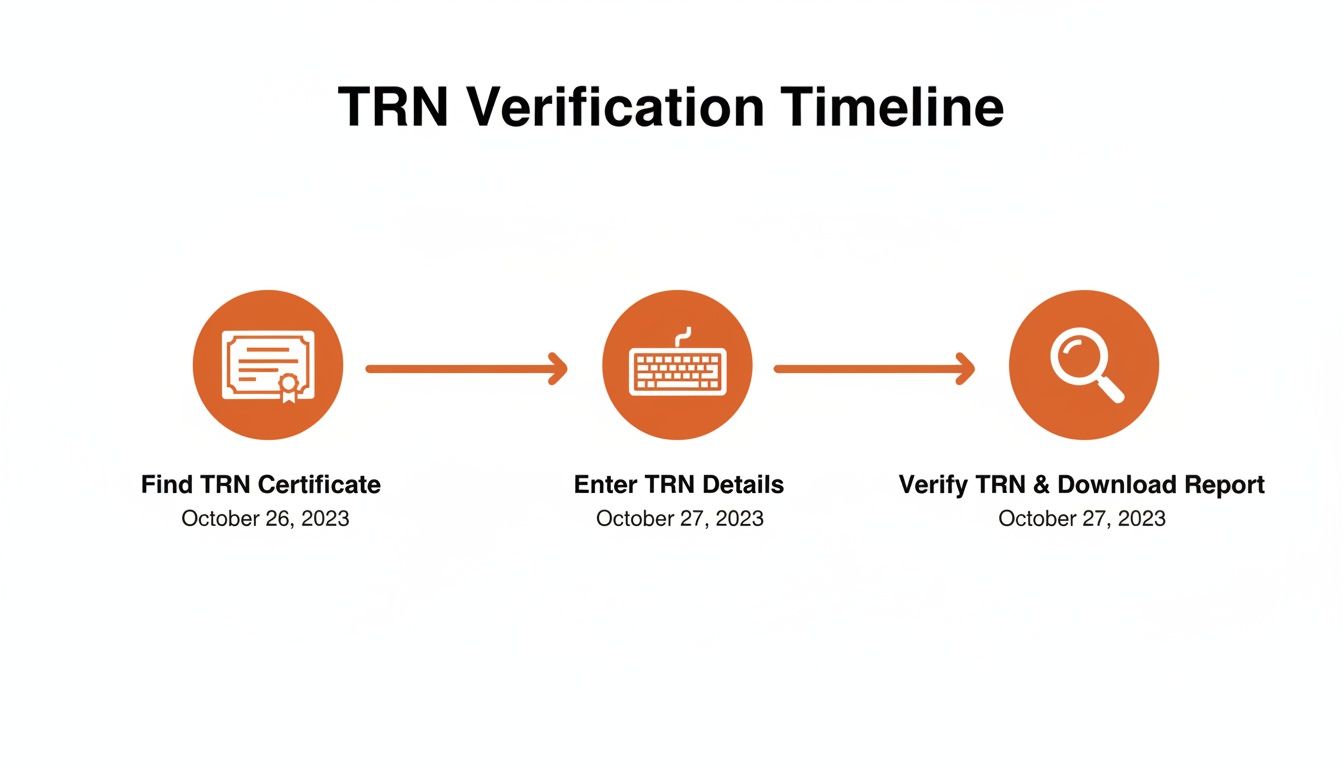
As you can see, the steps are few, but accuracy at each stage is what determines the success of your e-invoicing submissions.
The Shift from Simplified to Detailed Invoices
As the UAE prepares for the e-invoicing system to go live, the TRN's importance will only grow. It will become a non-negotiable component of every B2B and B2G invoice.
This change is supported by new regulations that will phase out simplified tax invoices. Previously, TRN errors were a common issue, with around 20% of early VAT returns being flagged for mistakes, increasing audit risks for businesses. Those days are ending.
The table below outlines the timeline and what to expect as the mandate rolls out.
E-Invoicing Mandate TRN Requirements Overview
| Phase | Effective Date | Affected Businesses | Key TRN Requirement |
|---|---|---|---|
| Phase 1 | July 2026 | Large taxpayers and listed companies (to be confirmed by FTA) | Mandatory TRN for both supplier and buyer on all B2B/B2G e-invoices. |
| Phase 2 | TBC (Likely 2027) | Medium-sized businesses | Full TRN validation becomes standard practice for this group. |
| Phase 3 | TBC (Likely 2028) | All remaining VAT-registered businesses | TRN requirement extends to all B2B/B2G transactions nationwide. |
This phased approach gives businesses time to adapt, but the direction is clear: complete and accurate TRN data is the future.
Key Takeaway: The e-invoicing mandate transforms TRN validation from a best practice into a strict, automated requirement. Proactively verifying every supplier and customer TRN is the only way to guarantee your invoices are accepted by the system without delay.
Preparation is key. Cleaning your master data and implementing solid validation checks now is critical. For a deeper look into the mandate, check our guide on what UAE businesses need to know about e-invoicing.
Common TRN Mistakes That Will Get Your Invoices Rejected
Even a minor mistake with a Tax Registration Number can cause significant problems, such as rejected invoices, delayed payments, and compliance headaches. With the UAE e-invoicing mandate approaching, there will be zero room for error. Understanding these common mistakes is the first step to preventing them.
A single incorrect digit in a TRN number uae is enough for the Federal Tax Authority's system to reject an invoice. This is a machine-to-machine check that demands 100% accuracy, unlike a manual review where a typo might be overlooked.
Simple Typos and Data Entry Errors
The most common cause of TRN issues is human error. Mistyping one of the 15 digits or accidentally pasting the wrong number into a field happens more often than you might think.
These small errors have big consequences. An invoice with a TRN typo will instantly fail the PINT AE validation, specifically the BR-AE-10 rule. The result is immediate rejection, forcing your team to cancel the invoice, correct the number, and resubmit, which delays the entire payment cycle.
Outdated and Invalid TRN Information
Businesses change, and so do their VAT registrations. A common oversight is using an old TRN for a supplier who has since deregistered from VAT. Their number is now invalid but may still exist in your vendor master file.
The only way to avoid this is to regularly check the TRNs of your key suppliers and customers. A TRN that was valid six months ago may not be valid today.
Recent analysis highlights the importance of TRN accuracy. Audits between 2023 and 2025 found that 18% of invoices had TRN errors, particularly in high-volume sectors like retail. With non-compliance penalties expected to increase to AED 50,000 after 2026, addressing this now is essential. You can discover more insights into the latest VAT law amendments here.
Confusing a TRN with Other Business Numbers
Another frequent mistake is confusing the TRN with other official company numbers. This is an easy error to make but one that guarantees invoice rejection.
Commonly confused numbers include:
- Trade Licence Number: Issued by the Department of Economic Development, this number relates to your legal right to operate, not your tax status.
- Company Registration Number: This identifies your legal business entity but is not used for FTA compliance on an invoice.
- Internal Vendor ID: This unique code used by your ERP to identify a supplier is for internal use only and has no place in the TRN field of an official e-invoice.
Each of these errors leads to a failed submission. For VAT UAE, the only number the system will accept is the official 15-digit TRN issued by the FTA.
Your Proactive Checklist for Perfect TRN Management
For the new UAE e-invoicing system, a proactive approach is the best strategy. Instead of reacting to rejected invoices, your team can get ahead of potential issues. Shifting from a reactive to a proactive mindset is key.
This checklist will help you get your TRN data in order now. By following these steps, you will not only ensure FTA compliance but also avoid the stress and last-minute panic that come with regulatory changes. This protects your cash flow and builds a solid foundation before the new rules take effect.
Audit Your Master Data Files
Start with a deep clean of your supplier and customer master files. Over time, these files can become cluttered with outdated or incorrect TRNs.
- Review Existing Records: Export a complete list of your suppliers and customers, then methodically check each TRN number UAE against the official FTA portal.
- Flag and Correct Errors: Tag any TRNs that are invalid, missing, or suspicious. Contact the business to get the correct, active number and update your system immediately.
- Standardise Data Entry: Establish a consistent format for entering TRNs into your accounting or ERP software to prevent future errors.
Strengthen Your Onboarding Process
The best time to ensure TRN accuracy is from the beginning. Your new vendor and customer onboarding process is the ideal place to enforce this.
A valid TRN number UAE is not just another field to complete; it is the key to a successful transaction in the new system. Making TRN verification a mandatory step during onboarding is the most effective way to prevent future e-invoice rejections.
Make it a firm policy: no new business relationship is activated in your system until their TRN has been verified. This small change in your workflow will ensure that all future transactions are based on clean, validated data.
Train Your Finance and Procurement Teams
Ensure everyone who handles supplier or customer data understands why TRN accuracy is critical for VAT UAE compliance. This includes teams from procurement to accounts payable.
- Explain the Consequences: Clearly explain that one wrong digit in a TRN will lead to a rejected e-invoice, causing delayed payments and manual rework.
- Provide Practical Guidance: Show them how to use the FTA’s verification tool. Document the procedure and make it easily accessible.
- Assign Clear Responsibility: Designate who is responsible for verifying and maintaining TRN data to create clear ownership and accountability.
This table contrasts manual habits with a modern, automated approach to TRN validation.
TRN Management Action Plan
| Task | Manual Process (High Risk) | Automated Pre-Validation (Low Risk) |
|---|---|---|
| New Supplier Onboarding | Relies on manual checks; prone to human error and easily skipped. | TRN is automatically validated via API before the supplier is created. |
| Existing Data Clean-up | A one-time, labour-intensive project that quickly becomes outdated. | Continuous, automated monitoring of all master data to flag invalid TRNs. |
| Invoice Processing | Invalid TRNs are only caught after submission, causing rejections. | Every invoice's TRN is checked before it's sent, preventing failures. |
| Team Training | Requires constant reinforcement and is dependent on individual diligence. | The system enforces the rule, reducing the burden on staff and ensuring consistency. |
Relying on manual processes is a high-risk strategy. An automated pre-validation tool builds a safety net into your workflow, ensuring every TRN is correct before it can cause a problem.
How Tadqiq Streamlines TRN Validation and Prevents Errors
Manually checking every single TRN is not just tedious; it's a significant risk, especially with the UAE e-invoicing mandate on the horizon. It creates opportunities for human error that can lead to rejected invoices and delayed payments.
Imagine catching every potential TRN number uae mistake before it becomes a problem. This is how you can transform your compliance process from a reactive headache to a proactive strength.

Instead of hoping your team remembered to check the FTA portal, an automated pre-validation platform acts as a safety net. It scrutinizes your invoice data against all official rules before submission.
The Tadqiq Advantage
Tadqiq is designed specifically to handle the complexities of FTA compliance. Our platform uses the same PINT AE validation checks as the government’s system.
This means we can instantly flag an invalid TRN. Instead of a confusing technical code, we provide clear, simple error messages that show you exactly what's wrong and how to fix it.
Tadqiq is more than a validation tool; it provides the confidence your finance team needs to navigate the e-invoicing mandate seamlessly. By preventing errors at the source, you protect your cash flow and free up valuable time.
For businesses dealing with high invoice volumes, this approach is a game-changer. You can upload entire batches of invoice files directly from your ERP—whether it’s Zoho, Oracle, or an Excel export.
Our system validates everything in under 30 seconds, secured with bank-level encryption where your sensitive invoice data is never stored. This pre-submission check ensures that when you submit your e-invoices, they are accepted on the first try. Integrating this step into your workflow eliminates rejection risks and keeps your business running smoothly.
Ready to take the stress out of e-invoicing? Prepare for compliance with Tadqiq today.
Frequently Asked Questions About TRN Numbers
Here are straightforward answers to common questions we hear from finance teams about the UAE Tax Registration Number.
Can I Use a TRN from a Business in a Different Emirate?
Yes. A TRN number UAE is a federal identifier issued by the FTA, valid across all seven Emirates. It does not matter if your supplier is in Dubai and your business is in Abu Dhabi.
As long as the TRN is active and valid on the FTA portal, you can use it on your invoices. The number's validity is what matters, not the business's location.
What Is the Difference Between a TRN and a TIN?
It's easy to confuse these two. In the UAE, the Tax Registration Number (TRN) is specifically for all matters related to VAT UAE. It functions as your unique VAT account number.
A Tax Identification Number (TIN) is a broader, global term for any number used for tax purposes. For the upcoming UAE e-invoicing mandate and its PINT AE standard, the TRN is the only tax ID that matters for VAT-registered businesses.
What Happens If My Customer Gives Me an Incorrect TRN?
This can create significant problems. If you issue an e-invoice with an invalid customer TRN, the FTA's system will reject it once the mandate is live.
The rejection means your customer cannot claim their input tax credit, and you must cancel the original invoice. You will then need to obtain the correct TRN and issue a new, corrected invoice. This extra administrative work delays payment, which is why verifying the TRN before issuing the invoice is so crucial.
Do Businesses in UAE Free Zones Need a TRN?
It depends on their business activities. If a company in a free zone sells taxable goods or services to a business on the UAE mainland, they must register for VAT and obtain a TRN, provided they meet the mandatory registration threshold of AED 375,000.
For e-invoicing, the rule is simple: if you make a taxable supply to a mainland business, their TRN must be on your invoice, and the same applies if they supply you. The nature of the transaction dictates the requirement, not just the business's location.
Ready to streamline your e-invoicing? Try Tadqiq today at tadqiq.ae.