A Guide to TRN Verification FTA for UAE E-Invoicing
Master TRN verification FTA for UAE e-invoicing. Our guide covers manual checks, APIs, and batch validation to ensure VAT compliance and avoid penalties.
Posted by
 Tadqiq Team
Related Reading
A Practical Guide to E-Invoicing in the UAE
Master e invoicing in UAE. This guide breaks down the PINT AE standard, FTA compliance deadlines, and how to prepare your business for the 2026 mandate.
Read →
A Practical Guide to HS Codes for Dubai Customs & E-Invoicing Compliance
Discover hs codes dubai customs and learn how accurate classifications speed up UAE trade, FTAs, and customs clearance.
Read →
Your Guide to Seamless VAT Registration UAE Compliance
A practical guide to VAT registration UAE. Learn mandatory thresholds, required documents, and how to navigate the EmaraTax portal for full FTA compliance.
Read →
Running a business in the UAE means VAT compliance is non-negotiable, and that starts with TRN verification. This simple check ensures your supplier's Tax Registration Number (TRN) is valid with the Federal Tax Authority (FTA). Overlooking this step can lead to rejected input tax claims and costly penalties, directly impacting your cash flow.
The Role of TRN Verification in UAE VAT Compliance

For any business managing Value Added Tax (VAT) in the UAE, confirming a supplier's TRN is a critical financial safeguard. To claim VAT recovery on an invoice, it must feature a legitimate, active TRN. An invalid number means the FTA can deny your claim, creating a direct hit on your company's funds.
This isn't just about administrative compliance; it's about protecting your business from financial risk. Accepting an invoice with a fake or inactive TRN exposes you to potential losses, especially as the FTA's risk-based audits become more sophisticated.
Why Diligent Verification Matters
The stakes are rising with the upcoming mandatory UAE e-invoicing system, built on the PINT AE standard. This digital framework will validate every e-invoice automatically. An incorrect TRN will result in an immediate rejection, causing payment delays and administrative burdens.
To combat fraud, the FTA provides a simple TRN verification process. The TRN is a unique 15-digit number issued to every business registered under VAT UAE law. Using the FTA's online tool, you can check these numbers in real-time, ensuring your invoices are accurate and your input VAT recovery is secure. For more details, see our guide on what a TRN number is.
Ultimately, making TRN verification fta checks a standard business practice builds a strong foundation for FTA compliance. It helps you:
- Protect Your Cash Flow: Ensure every input tax claim is supported by a valid tax invoice, preventing unexpected rejections.
- Reduce Audit Risk: Demonstrate due diligence, making your business a lower-risk target for FTA audits.
- Ensure Smooth Operations: Prepare your business for a seamless transition to the new e-invoicing era.
How to Validate a Tax Registration Number
Validating a Tax Registration Number (TRN) before processing an invoice is a cornerstone of FTA compliance. Depending on your transaction volume, several methods are available. Choosing the right approach for your TRN verification fta process can prevent costly errors and streamline your operations.
Manual Verification Through the FTA Portal
The most direct method is using the FTA's official online portal. It is a free, publicly accessible tool that does not require a login. This manual approach is ideal for businesses with a low volume of invoices or for one-off checks, such as when onboarding a new supplier.
The portal provides an immediate, official answer directly from the source.
Simply enter the 15-digit TRN into the search field on the FTA website. The system will instantly confirm if the number is valid and display the legal entity name associated with it.
This final step is crucial. You must ensure the name on the invoice perfectly matches the name registered with the FTA. This simple check helps avoid significant compliance issues down the line.
While reliable for occasional use, this manual process becomes inefficient when handling dozens or hundreds of invoices. Entering TRNs one by one is tedious and increases the risk of human error, which is why growing businesses often seek automated solutions. You can learn more about the number's format in our overview of the UAE TRN number.
Automated Batch and API Checks
For businesses managing higher transaction volumes, automation is the most practical solution. Integrating TRN verification directly into your financial systems eliminates manual work and significantly improves accuracy, ensuring continuous FTA compliance.
Two main automated options are available:
- Batch Verification: This is an excellent intermediate solution. You can upload a file (typically CSV or Excel) containing multiple TRNs. A platform like Tadqiq processes the entire list at once, generating a report that identifies any invalid or inactive numbers. This is highly beneficial for accounts payable teams needing to verify entire supplier lists periodically.
- API Integration: For maximum efficiency, an Application Programming Interface (API) is the best choice. An API connects your accounting software or ERP directly to a validation service. This enables TRN checks to occur automatically in the background whenever a new supplier is added or an e-invoice is created, making compliance a seamless part of your workflow.
Automating your TRN checks can reduce validation time by over 90% compared to manual methods. This efficiency gain embeds a critical compliance step directly into your invoicing process, preparing you for the PINT AE standard.
Comparing TRN Verification Methods
Choosing between manual, batch, or API-driven verification depends on your business's scale and operational needs. A small business may find occasional manual checks sufficient, while a large enterprise will benefit immediately from a fully integrated API. This table highlights the key differences to help you decide.
| Method | Best For | Speed | Accuracy | Scalability |
|---|---|---|---|---|
| Manual Portal Check | Low invoice volumes, one-off supplier checks, start-ups. | Slow | High (if no typos) | Low |
| Batch (CSV) Upload | Medium volume, periodic supplier list verification. | Moderate | Very High | Medium |
| API Integration | High volume, real-time validation, large enterprises. | Instant | Highest | High |
The goal remains the same regardless of the method: ensure every TRN you process is valid and active. By selecting the right tool, you can transform a cumbersome compliance task into a streamlined, error-free part of your daily operations.
Common TRN Validation Errors and How to Fix Them
Even a minor error in a Tax Registration Number can cause significant compliance issues, especially with the UAE's upcoming PINT AE e-invoicing standard. A single incorrect digit is enough to get an e-invoice rejected, leading to payment delays and rework for your finance team.
Fortunately, most validation errors fall into a few common categories. Understanding these common pitfalls is the first step toward preventing them.
Simple data entry mistakes, such as typos or transposed digits in the 15-digit number, are frequent but easy to catch with a quick review. However, more subtle issues often require closer attention.
Mismatched Legal Entity Names
A common error is a mismatch between the legal entity name on the invoice and the one registered with the FTA. The TRN itself may be valid, but it could belong to a different legal entity than the supplier listed.
For example, your invoice is from 'ABC Trading', but the TRN is registered to 'ABC Holdings FZE'. To the FTA, this is a red flag suggesting an improper attempt to claim VAT credits. Always ensure the English and Arabic legal names returned by a verification tool match the supplier's invoice details exactly.
Inactive or Deregistered TRNs
Another critical issue is using an inactive or deregistered TRN. A supplier may have been VAT-registered when you began working with them, but their status can change. Businesses may close or deregister if their turnover falls below the mandatory registration threshold.
If you use an inactive TRN, any VAT claim associated with that invoice is invalid. This is why a one-time check is insufficient; periodic re-verification of your entire supplier list is an essential internal control. If you're new to the process, our guide on how to register for VAT in the UAE provides a helpful overview.
An automated platform can instantly flag these issues, often using specific e-invoicing error codes like 'BR-AE-10 invalid TRN'. This saves your team from manual investigation, allowing them to contact the supplier for correct information and update records before the e-invoice is sent.
Resolving these issues requires a clear, proactive process.
- Catching Typos: Always cross-reference the TRN on the invoice with the supplier's official tax certificate or business documents.
- Fixing Mismatches: Contact the supplier immediately to confirm their correct legal entity name and request a corrected invoice.
- Handling Inactive TRNs: Place a hold on the payment and contact the supplier to confirm their current VAT status before proceeding.
By embedding these checks into your accounts payable workflow, you shift from reacting to problems to preventing them.
Weaving TRN Checks Into Your E-Invoicing Workflow
With the UAE's transition to mandatory e-invoicing, TRN verification can no longer be an afterthought. For true FTA compliance, this check must be an integral part of your accounts payable process from the very beginning.
When you embed TRN validation into your daily operations, your team can prevent problems before they arise. The goal is to catch every error long before an e-invoice reaches the tax platform, saving you from the delays and costs of rejected invoices.
Building a Protective Layer for Compliance
A reliable TRN validation tool acts as a protective shield between your ERP system and the official tax platform. By establishing a rule to verify every new supplier during onboarding, you build a clean and reliable master file. This ensures every invoice you generate is based on accurate, pre-vetted data.
This proactive approach is crucial as FTA audits become more frequent. A significant increase in inspection visits signals a clear shift towards more rigorous, risk-based enforcement. As the FTA's audit strategy evolves, maintaining organised and compliant records is non-negotiable.
Proactive TRN verification is more than just avoiding invoice rejections. It is a core business practice that demonstrates due diligence and strengthens your defence in an FTA audit.
The most common issues are often the simplest to solve when caught early.
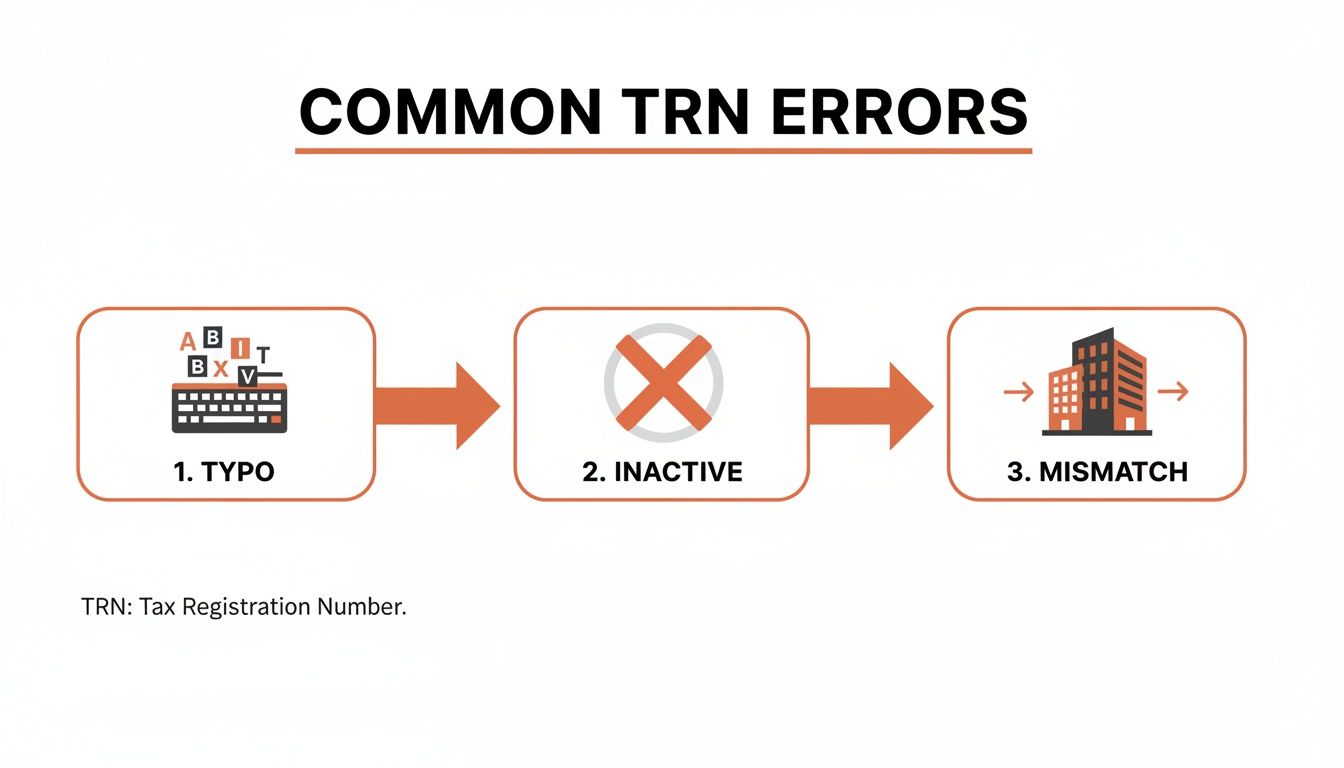
As shown, basic typos, inactive registrations, and name mismatches are the primary causes of validation failures.
Creating Practical Internal Checklists
To integrate this process effectively, your finance team needs clear and simple guidelines. An internal checklist can standardise the procedure, ensuring consistency whether you are onboarding a new supplier or processing monthly payments.
Your checklist should include the following points:
- New Supplier Onboarding: Mandate a successful TRN verification fta check before a new supplier is created in your accounting system.
- Invoice Entry Protocol: Before entering an invoice for payment, verify the TRN on the document against your validated supplier master file.
- Quarterly Supplier Audit: Schedule a recurring task to re-validate your entire supplier database. This helps identify any TRNs that have become inactive since your last check.
Implementing these protocols turns TRN verification into a disciplined habit. It is a critical component for any business preparing for the PINT AE e-invoicing standard. For more information, read our guide on UAE e-invoicing and its specific requirements.
Why New VAT Rules Make TRN Verification More Important
Recent updates to the UAE’s VAT laws have increased the importance of Tax Registration Number compliance. These changes have fundamentally altered how businesses must handle input tax credits. Now, diligent TRN verification fta is no longer just a best practice—it's a financial necessity.
Previously, an invoice with an invalid TRN might have been a minor administrative issue. Under the new, stricter rules, it can lead to the permanent loss of the input tax credit for that transaction.
The Impact of Stricter Deadlines and FTA Powers
The regulatory landscape is tightening. The Federal Tax Authority now has expanded powers to deny claims associated with non-compliant or fraudulent suppliers. This means your business is responsible for verifying the legitimacy of every TRN on every invoice you process.
A key driver for this change is the series of amendments to the UAE VAT rules. These updates underscore the FTA's authority to reject input tax recovery tied to tax evasion schemes. The changes have serious financial implications, making rigorous supplier vetting essential. You can find more details on the new VAT rules on Cleartax.com.
This creates a direct link between a supplier's valid TRN and your ability to reclaim VAT, placing a greater emphasis on supplier management.
Protecting Your Input Tax Credits
To safeguard your company's finances, you can no longer assume a supplier's TRN is correct and active. The risk of losing legitimate tax credits is too high. This requires a more proactive and systematic approach to verification.
A key best practice is to re-verify your entire supplier master file periodically. This ensures every TRN on record is active and accurate, protecting your claims well before tax deadlines.
An invoice is only as good as the TRN on it. With the new rules, a faulty TRN doesn't just delay a VAT claim—it can erase it completely. Regular verification is your best insurance policy against lost credits.
This process is about more than just checking numbers; it's about ensuring end-to-end FTA compliance. For a refresher on the basics, our guide on how to calculate VAT in the UAE explains the mechanics. By confirming every supplier's status, you protect your bottom line and secure every dirham of input tax you are entitled to.
Getting Your Business Ready for What's Next
Mastering TRN verification is fundamental to compliant business operations in the UAE. The reasons for checking every supplier's TRN are clear: it protects your bottom line from rejected input tax claims and helps you avoid penalties under increasingly strict FTA regulations.
Solutions are available for every type of business, from manual checks on the FTA portal for small operations to fully automated API integrations for large enterprises. The key is to make these checks a non-negotiable part of your daily financial workflow.
This is not just about meeting current requirements; it's about preparing for the mandatory PINT AE e-invoicing framework. By standardising TRN verification fta checks now, you transform an administrative task into a strategic advantage for future compliance.
By embedding these practices, you build a more robust, efficient, and future-proof financial operation ready for the UAE's evolving tax landscape.
Ready to streamline your e-invoicing? Try Tadqiq today.
Common Questions on TRN Verification
As you manage Tax Registration Numbers, certain questions frequently arise. Here are answers to some of the most common queries from UAE business owners and finance managers regarding TRN checks and FTA compliance.
How Often Should We Be Verifying Supplier TRNs?
Verifying a TRN only during supplier onboarding is a good start, but it's not enough. A business can deregister from VAT if its turnover falls below the mandatory threshold, or its status might change for other reasons.
The best practice is to re-verify your entire supplier database at least quarterly. This preventative step helps you identify status changes before they affect your input tax claims. For critical or high-volume suppliers, a monthly check is even better.
What's the Difference Between a "Valid" TRN and an "Active" One?
This distinction is crucial. A TRN can be valid in its format—a genuine 15-digit number once registered in the FTA's system—but not currently active. An inactive TRN typically indicates that the business has deregistered from VAT.
If you receive an invoice with an inactive TRN, it is not a valid tax invoice, and you cannot use it to reclaim VAT UAE. Whether you use the FTA portal or an automated tool, always confirm the "active" status.
Key Takeaway: Only an active TRN on a compliant tax invoice provides the legal basis to recover input VAT. An inactive TRN, even if previously valid, will lead to a rejected claim.
Are There Penalties for Accepting an Invoice with an Invalid TRN?
While there is no direct penalty for accepting the invoice, the financial consequence is the FTA disallowing your input tax recovery claim for that transaction. This is because the document is not considered a valid tax invoice.
This means the 5% VAT you paid to the supplier becomes a direct cost to your business, reducing your profit. With the upcoming PINT AE e-invoicing mandate, an invalid TRN will cause an e-invoice to be rejected instantly, halting the transaction.
Ready to streamline your e-invoicing? Try Tadqiq today.